How to Calculate FMLA Hours: The Intermittent Leave Calculator Guide for SMBs
Stop guessing with intermittent FMLA. One rounding error in your spreadsheet could trigger a costly compliance nightmare. Learn how to calculate leave hours accurately with our simple guide for SMBs.
Verified by AI SoloHR Compliance & Editorial Team (U.S. Employment Law & Regulatory Compliance Research Group)
Last Audit: Oct 14, 2026 13:04
Calculation path
Turn an intermittent leave calculation into a traceable case record
The math is only part of the work. HR also needs to keep the schedule basis, hours deducted, certification context, and manager updates tied to the same case.
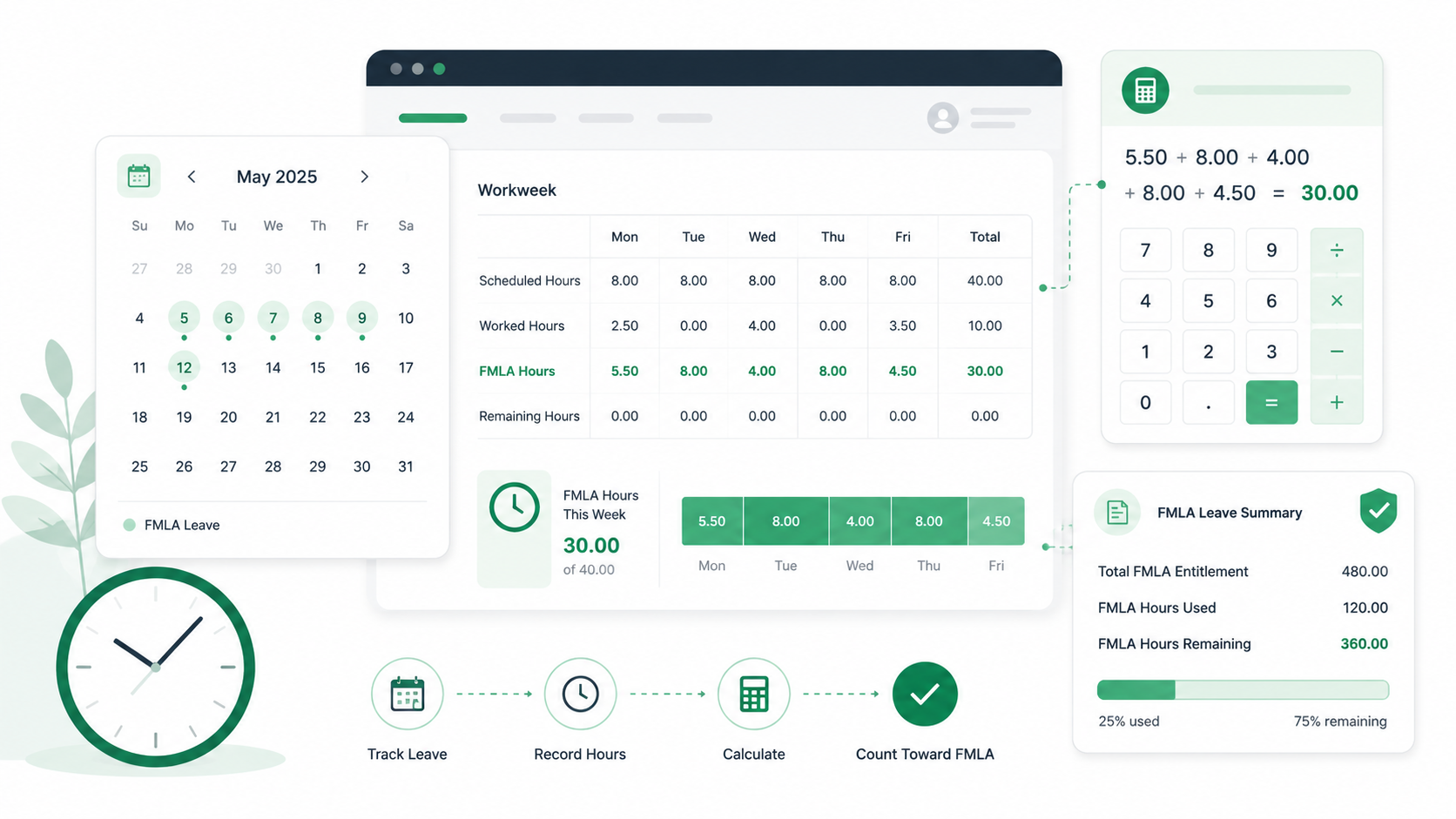
Start with the employee's normal weekly schedule before converting 12 workweeks into hours.
Deduct intermittent leave in the smallest increment your policy and payroll records support.
Keep the calculation beside the certification status and communication history, not in a detached spreadsheet.
For a single HR manager at a growing company, there are few phrases more stressful than "intermittent FMLA." Unlike standard continuous leave—where an employee is out for a clear, predictable block of time—intermittent leave allows employees to take job-protected time off in increments of hours or days.
Without a reliable FMLA time off calculator, tracking these erratic hours manually is a compliance disaster waiting to happen.
Consider the real story of a retail business in Ohio. In early 2026, their solo HR generalist was tracking an employee’s intermittent FMLA leave for chronic migraines using a custom Excel sheet. The employee took time off in blocks of 2 to 4 hours.
Because of a rounding error in the spreadsheet formula, the tracker showed the employee had exhausted their FMLA hours by late September. The company denied a subsequent absence and terminated the worker.
Sources and review notes
This article is written for U.S. small-business HR teams in 2026 and should be checked against your own policy, state requirements, and counsel guidance before use in a contested employment decision. AI SoloHR provides workflow structure, reviewed drafting support, and educational resources; it does not provide legal advice or make final employment decisions.
Statutory Sources & Regulatory Citations
This compliance document references official regulatory guidance from federal employment enforcement agencies:
The employee sued, and the court found that the manual spreadsheet calculations had incorrectly shorted the employee by 14 hours of FMLA entitlement. The resulting back-pay, legal fees, and compliance audit penalties cost the business over $85,000.
To avoid these audit risks, small business employers must understand the exact legal math behind tracking FMLA hours in 2026.
The Foundation of FMLA Eligibility: The 1,250-Hour Hurdle
Before calculating hours of leave, you must verify that the employee is eligible. The U.S. Department of Labor (WHD) enforces the federal FMLA regulations which require that an employee meets three strict criteria:
The 50/75 Rule: The employer must employ at least 50 employees within a 75-mile radius of the employee's worksite.
Service Requirement: The employee must have worked for the employer for at least 12 months (which do not need to be consecutive, provided the break in service does not exceed 7 years).
Hours of Service: The employee must have actually worked at least 1,250 hours during the 12-month period immediately preceding the start of the leave.
Calculating the 1,250 hours of service requires reviewing actual hours worked. Paid time off, such as vacation days, holidays, personal leave, or sick leave, does not count toward the 1,250-hour threshold. Only actual productive work hours qualify. This means you must audit hourly timecards to exclude paid non-working time before designating leave.
The Minimum Increment Rule: The Core of Intermittent FMLA
Under FMLA regulations, you cannot require an employee to take more FMLA leave than is medically necessary. You must allow FMLA leave to be taken in the shortest increment of time that your payroll system uses to track other forms of absences, provided it is no greater than one hour.
This creates a strict tracking constraint for employers:
Payroll Increment vs. FMLA Increment
15-Minute Payroll tracking: If your payroll tracks time in 15-minute increments, you must track FMLA in 15-minute increments. You cannot force a worker to take a full hour of leave if they only missed 15 minutes.
1-Hour Cap: If your payroll system only tracks time by the hour, the maximum FMLA minimum increment you can enforce is one hour.
Physical Impossibility Exception: In rare industries (like flight crews or specialized manufacturing) where an employee cannot physically enter mid-shift, the entire period they are absent may be counted as FMLA.
Step-by-Step FMLA Hour Calculations for Varied Schedules
An employee's FMLA allotment is directly proportional to their standard schedule.
Step 1: Calculate the Standard Baseline Workweek
An employee's FMLA allotment is directly proportional to their standard schedule.
For Constant Schedules:
Standard 40-Hour Week: If an employee regularly works 40 hours per week, their FMLA entitlement is 480 hours (12 weeks × 40 hours).
Part-Time 24-Hour Week: If an employee regularly works 3 days a week for 8 hours per day, their entitlement is 288 hours (12 weeks × 24 hours).
For Variable/Fluctuating Schedules:
If an employee's schedule varies from week to week, you must calculate a weekly average of the hours worked over the 12 weeks prior to the start of the FMLA leave.
Example: An employee's weekly hours over the last 12 weeks were: 35, 45, 40, 38, 42, 40, 37, 43, 40, 39, 41, 40.
Sum of hours = 480 hours. Average weekly hours = 40 hours.
Step 2: Convert Leave to a Fraction of the Workweek
To track FMLA compliance accurately, you must deduct the exact fraction of the workweek used. If a 40-hour-per-week employee takes 4 hours of FMLA, they have used 1/10 (or 10%) of a workweek.
Calculation Formula:
$$\text{FMLA Week Fraction Used} = \frac{\text{Hours of Leave Taken}}{\text{Standard Baseline Hours Per Week}}$$
Example: A part-time employee with a 24-hour workweek takes 6 hours of intermittent FMLA leave.
$$\text{Fraction} = \frac{6}{24} = 0.25\text{ workweeks}$$
Remaining FMLA Balance = 12 workweeks - 0.25 workweeks = 11.75 workweeks.
Step 3: Factor in Overtime shifts
If an employee is regularly scheduled to work overtime, those overtime hours must be factored into their baseline workweek and their FMLA allotment.
Example: An employee regularly scheduled to work 48 hours per week is entitled to 576 hours of FMLA leave (12 weeks × 48 hours). If they miss a 4-hour overtime shift, those 4 hours are deducted from their FMLA balance, and the baseline is maintained.
The Impact of Holidays and Work Shut-Downs
A common area of confusion for HR managers is how holidays and temporary company shut-downs affect the FMLA hourly deduction:
Holidays During Continuous Leave
If a holiday falls during a week when an employee is on continuous FMLA leave, the entire week counts as FMLA leave.
Holidays During Intermittent Leave
If the employee is taking intermittent FMLA leave and works part of the week, the holiday does not count as FMLA leave unless the employee was scheduled to work on that holiday but missed it due to FMLA reasons.
Temporary Company Shut-downs
If the company shuts down for a week or two (e.g., during a winter holiday or maintenance shutdown), the weeks the employer's activities have temporarily ceased do not count against the employee's FMLA entitlement.
Why Spreadsheets Fail for FMLA Tracking
Many small businesses rely on manual Excel templates to track these calculations. However, manual data entry lacks audit trails, is highly susceptible to formatting errors, and fails to manage notice deadlines.
Under the FMLA, employers must provide the Eligibility Notice (Form WH-381) within 5 business days of learning about a potential qualifying leave. Opposing counsel will look at the timing of your notices and the precision of your hour calculations to construct interference cases.
Instead of fighting with spreadsheet formulas, you can start tracking FMLA cases automatically using structured case management software. Dedicated tools manage the timeline, flag notice deadlines, and compute hours without the risk of manual calculation errors.
Frequently Asked Questions
Can an employer change the way FMLA hours are calculated mid-leave?
No. An employer must apply FMLA calculation methods consistently. If you calculate an employee's FMLA using their typical weekly schedule, you must maintain that baseline throughout the designated 12-month FMLA period.
Do overtime hours count towards FMLA leave calculations?
Yes. If an employee is regularly scheduled to work overtime, those overtime hours must be factored into their baseline workweek and their FMLA allotment. For instance, an employee regularly working 50 hours per week is entitled to 600 hours of FMLA leave (12 weeks × 50 hours).
How do holiday schedules affect FMLA tracking?
If a holiday falls during a week when an employee is on continuous FMLA leave, the entire week is counted as FMLA leave. However, if the employee is taking intermittent FMLA leave and works part of the week, the holiday does not count as FMLA leave unless the employee was scheduled to work on that holiday.
What happens if an employee's schedule is unpredictable?
If an employee works a highly unpredictable schedule where baseline weekly hours cannot be established, you must use a rolling 12-month average of their actual weekly hours to determine their FMLA entitlement.
Disclaimer: The information provided in this article does not, and is not intended to, constitute legal advice; instead, all information, content, and materials available on this site are for general informational purposes only. Readers should contact their attorney to obtain advice with respect to any particular legal matter.