AI SoloHR
For U.S. small businesses
ProductU.S. HR Use Cases
Free Calculators▼
FMLA Leave CalculatorFMLA Hours CalculatorIntermittent FMLA TrackerFMLA Eligibility & FTERemote FMLA EligibilityFMLA Reduced Schedule HourFMLA Interference RiskADA Process TimelineADA Documentation GeneratorBradford Factor Score
Resources▼
Resources OverviewGuides & ComplianceHR Templates & ChecklistsHelp Center & SupportSecurity & AI Safety
Case Studies▼
Case Studies OverviewFMLA CasesADA Accommodation CasesBenefits & Retirement CasesEmployee Relations CasesGeneral Compliance Cases
PricingBlog
Sign inStart Free
Toggle menu
ProductUse CasesPricingBlogSecurity
Free Toolsv
FMLA Leave CalculatorFMLA Hours CalculatorIntermittent FMLA TrackerFMLA Eligibility & FTERemote FMLA EligibilityFMLA Reduced ScheduleFMLA Interference RiskADA Process TimelineADA Documentation GeneratorBradford Factor Score
Case Studiesv
OverviewFMLA CasesADA CasesBenefits CasesEmployee Relations CasesCompliance Cases
Resourcesv
Resources OverviewGuides & ComplianceHR Templates & ChecklistsHelp Center & Support
Sign InStart Free
AI SoloHR

HR case management built for U.S. small businesses handling FMLA, ADA accommodations, employee relations, benefits renewals, and other audit-sensitive workflows.

Featured & Reviewed On
Featured on FoundrListAI SoloHR on Nick LaunchesProduct HuntG2 CrowdCapterraSaaSHubTrustRadiusTrustpilotSourceForgeIndie Hackers

Product

  • Features
  • Pricing
  • Resource Center
  • Guides & Compliance
  • HR Templates & Checklists
  • Help Center
  • U.S. HR Use Cases
  • FMLA Tracking Software
  • HR Case Management Software
  • Blog Updates

Free HR Tools

  • FMLA Leave Calculator
  • FMLA Eligibility & FTE
  • Remote FMLA Eligibility
  • FMLA Reduced Schedule Hour
  • FMLA Interference Risk
  • ADA Process Timeline
  • Bradford Factor Score

Company

  • About Us
  • Contact Support
  • Design Partner Program

Legal & Security

  • Security & Trust
  • Compliance Disclaimer
  • Privacy Policy
  • Data Handling
  • Terms of Service
  • Cookie Policy
  • Refund Policy
  • Data Request

2026 AI SoloHR. Built for HR teams of one at U.S. employers.

Sensitive U.S. HR data protected with private storage and TLS 1.3
Security & Trust

Security and privacy for sensitive HR workflows

AI SoloHR is built for U.S. small-business HR teams that need private cases, role-based access, document controls, and a clear operational history around sensitive employment work.

Built for U.S. employers and small-business HR teams.

What makes HR workflow data sensitive

HR workflow data often includes leave records, accommodation notes, employee relations updates, private files, and internal communications. That means the security question is not only about storage. It is also about who can see what, where the record lives, and how access is controlled over time.

  • Case notes can contain sensitive employment context
  • Documents may include medical or personnel-related files
  • Draft communications still require controlled access
  • Audit-sensitive records should remain easy to review later
How AI SoloHR handles workspace isolation

AI SoloHR is built around organization-scoped workspaces so each company operates inside its own boundary. Cases, documents, AI drafts, and timelines are tied to the active workspace instead of sitting in a shared public system.

  • Organization-level isolation
  • Role-based access by workspace member

What AI SoloHR does not do

AI SoloHR is designed to support secure workflow and documentation practices. It does not replace your internal security review, legal review, or policy obligations. It also does not make employment decisions for you or send sensitive AI-generated communications without human review.

Security contact

Security reports and sensitive questions can start through the contact page. A standard security.txt file is also published for discovery.

View security.txt

Data handling

Review the public summary for retention, deletion, access control, AI draft boundaries, and related data request paths.

Review data handling

Human review boundary

AI SoloHR keeps HR in the loop for drafts, access choices, documentation quality, and final employment actions.

Review AI safety

Verified product controls

See access, support, and private-document controls in the workspace

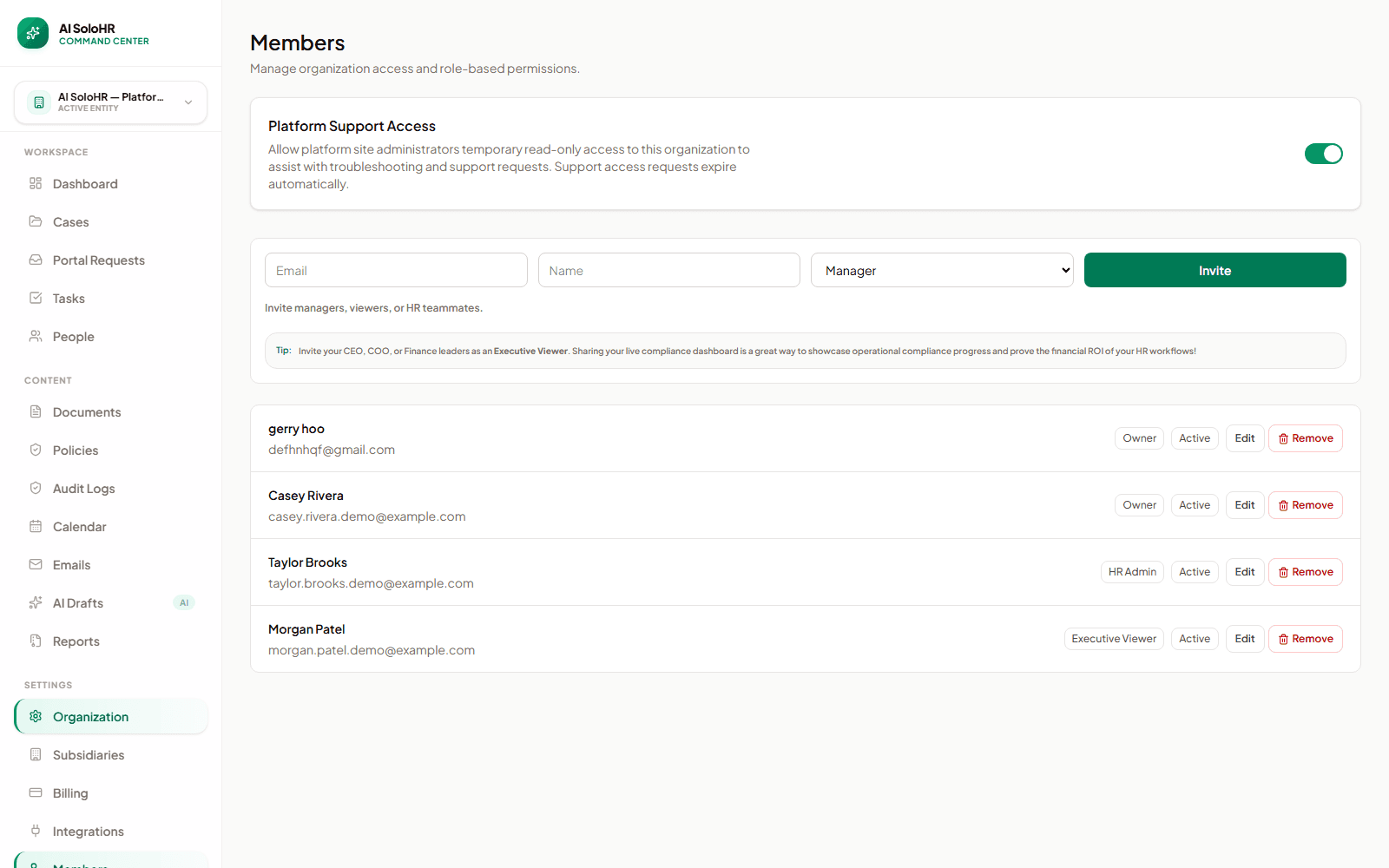
These screens use demo data and show the product controls buyers usually need to verify before putting sensitive HR records into a system.

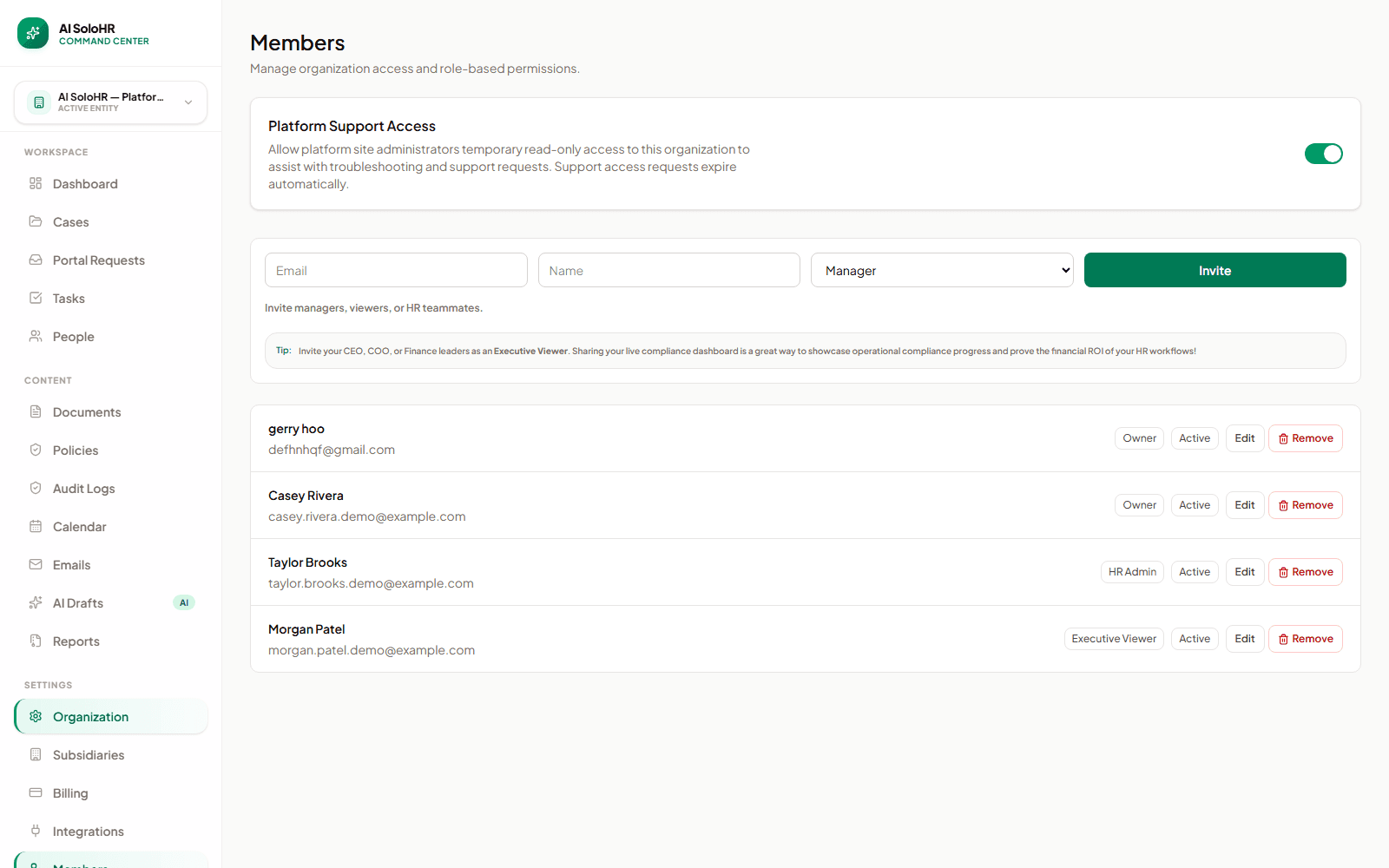
AI SoloHR members page showing owner, HR admin, and executive viewer roles

Role-based workspace access

Owners can invite teammates and review active roles without giving every participant the same level of access.

AI SoloHR Platform Support Access control with an explicit organization-level toggle

Explicit support access

Workspace owners control whether temporary read-only support access is allowed, and support requests expire automatically.

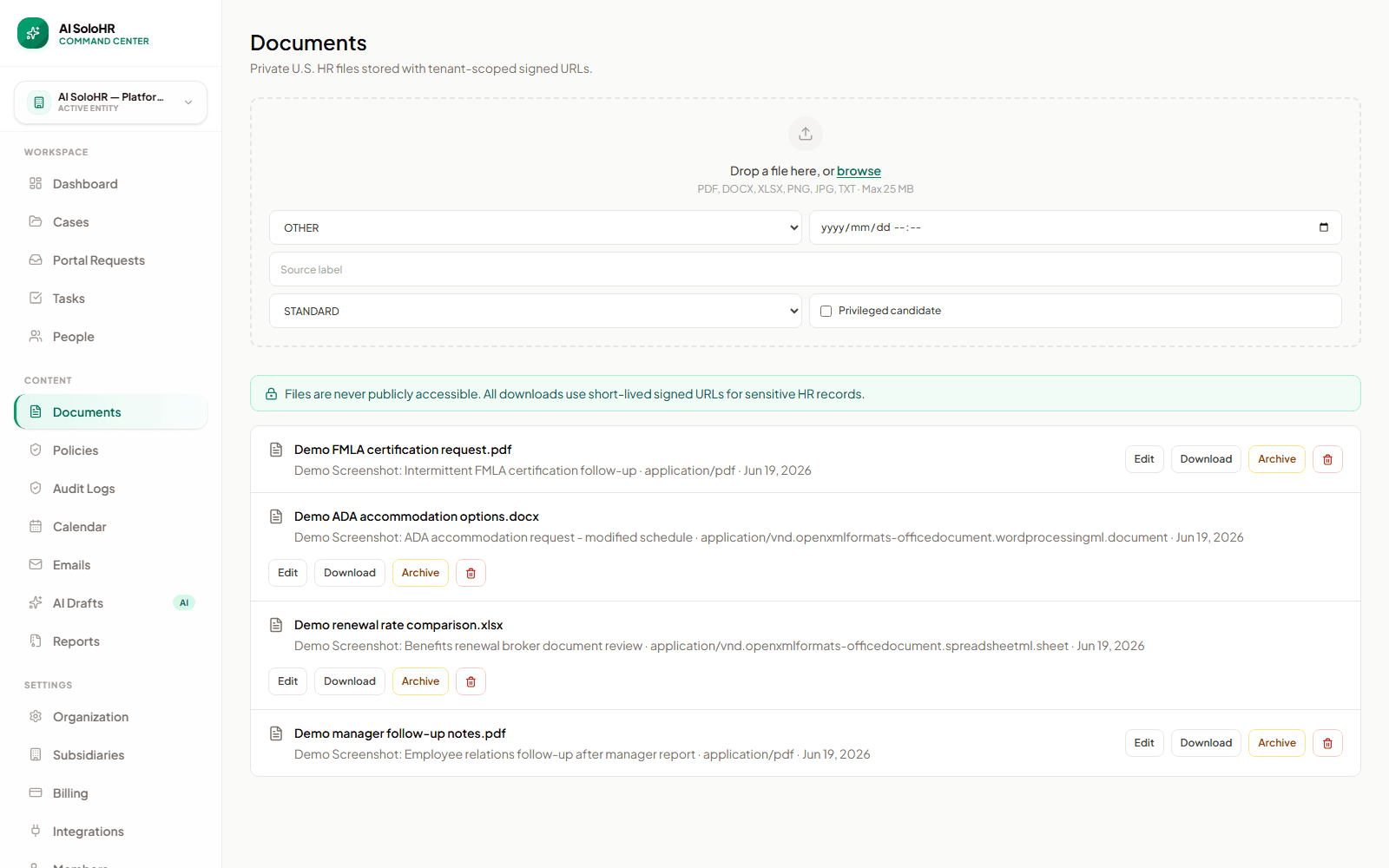
AI SoloHR private document vault showing case-linked HR files and signed URL controls

Private case-linked documents

Documents stay tied to the HR case and are delivered through controlled, short-lived access rather than public file links.

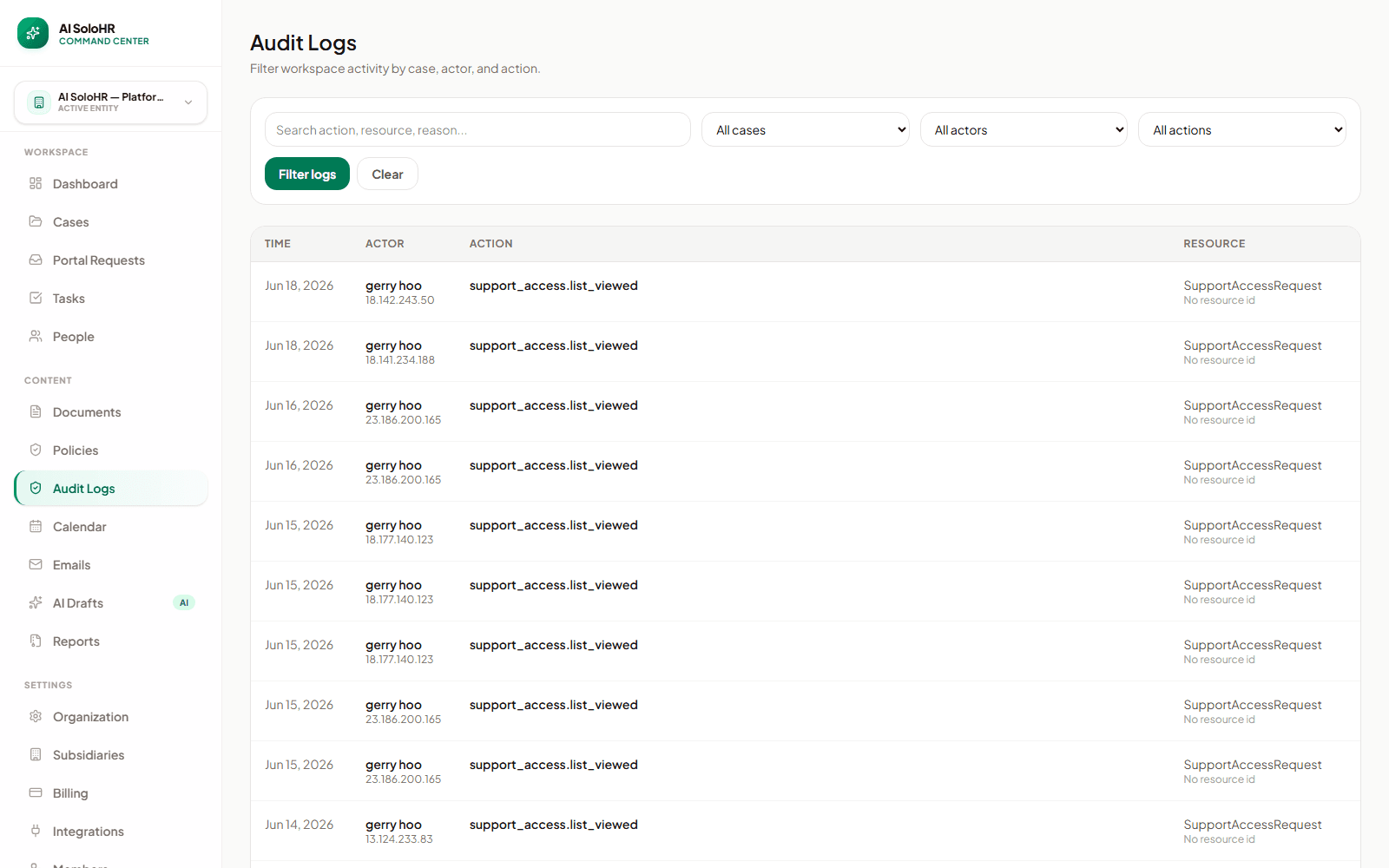
AI SoloHR audit log showing recorded workspace activity

Why workflow structure affects security

Sensitive HR work gets riskier when the facts, documents, and communication trail are scattered across inboxes and shared folders. Keeping the case history in one place makes access control and later review more realistic.

What teams should still review internally

Security and privacy still require internal judgment around who should have access, what should be documented, how long records should be retained, and when a case should be escalated outside the product workflow.

Different HR workflows create different privacy pressure

Security questions look different depending on the case type. That is why AI SoloHR is structured around case records instead of loose files and isolated messages. The goal is to keep the right details visible to the right people without losing the timeline that explains the work.

Leave and medical-adjacent cases

FMLA and similar leave workflows often include private dates, supporting files, and sensitive communication. The security goal is not only to store them privately, but to keep them attached to the right case with limited visibility.

Accommodation documentation

Accommodation work creates risk when request details, manager communication, and supporting files travel through too many inboxes or shared drives. A tighter case record makes both privacy and follow-up easier to manage.

Employee relations records

Chronology matters in employee relations work. Teams need factual notes, controlled collaboration, and a record that stays readable later without turning every manager into a full-workspace viewer.

What your team should still control internally

A secure product helps, but private HR work still depends on disciplined internal process. Teams should decide visibility, documentation style, and escalation rules deliberately rather than leaving those choices implicit.

  • Decide which roles should open, review, or only be informed about a case before the case becomes urgent.
Product controls

Controls that make companies more comfortable putting real HR data in the system

Security is not just encryption language. For HR teams, it is whether sensitive documents, manager access, support access, and reviewer links are visible and controlled inside the workflow.

Sensitive file access reasons

Medical, restricted, or privileged-candidate files can require a documented HR business reason before a signed URL is issued.

Case-level access grants

Managers and reviewers can be limited to the specific case they need instead of receiving broad workspace visibility.

Support access control

Workspace owners can decide whether platform support may access the account for troubleshooting, keeping support visibility intentional.

Expiring reviewer access links

Generate secure, read-only external sharing links for legal counsel, executives, or other stakeholders, complete with automatic expiration dates.

Client-side PII scrub tool

HR professionals can scrub email, phone, SSN, and address identifiers in the browser before draft generation or case creation.

Chained-hash audit trail

Audit logs use cryptographic chain hashes (SHA-256) to ensure logs are fully tamper-evident and audit-ready.

Keep exploring

AI safety boundaries

See how AI SoloHR keeps AI-generated text inside a human-reviewed draft workflow.

Open page

Audit trail and evidence

Understand how case timelines and records support audit-ready HR work.

Open page

HR documentation use case

See how notes, files, and tasks stay connected to the work they support.

Open page
Security posture

Practical controls for real HR workflows

Security is strongest when product controls and HR operating discipline work together. AI SoloHR helps reduce exposure by keeping sensitive work inside scoped cases, private files, access checks, and reviewable history.

Private file access

Documents are connected to cases and delivered through controlled access paths rather than public document indexes.

Role and case visibility

Workspace roles and case-level grants help limit who can view or act on sensitive records.

Reviewable history

Important activity is designed to create timeline or audit records that can be reviewed later.

Trust boundaries

What the product does and does not promise

Clear boundaries build trust. AI SoloHR supports secure workflows, but your organization still owns policy, access governance, legal review, and final employment decisions.

SECURED BY PRODUCT

AI SoloHR centralizes case records, private documents, access checks, and audit-friendly activity history.

NOT LEGAL COUNSEL

The platform tracks your internal actions. It does not provide legal advice, medical judgment, or guaranteed law compliance.

HUMAN PROCESS DEPENDENT

Sensitive HR work still depends on limited access, responsible documentation, and human review before action.

Security & Privacy FAQ

Is AI SoloHR built for sensitive HR documents?

Yes. AI SoloHR is designed around private HR workflows, case-linked documents, role-based access, and controlled file delivery rather than public file sharing.

How does AI SoloHR handle document access?

Documents are tied to cases and served through controlled access patterns such as short-lived signed URLs, rather than broad public links.

Can managers see every HR record in the workspace?

No. AI SoloHR is designed to support role-based access so teams can control visibility more carefully than they can in shared inboxes or folders.

How does the AI process my sensitive employee details?

AI SoloHR uses Google Cloud Vertex AI API for draft support and compliance checks. The product also includes a built-in 'Scrub PII' tool that runs entirely in your local browser, allowing you to mask emails, phone numbers, SSNs, and U.S. street addresses before any data is sent to the AI.

What is the immutable audit log?

Related compliance articles

How to Avoid FMLA Wrongful Termination Claims: Defensible Rules for Firing on Leave (2026)
Compliance

How to Avoid FMLA Wrongful Termination Claims: Defensible Rules for Firing on Leave (2026)

Read Post
How to Calculate Bradford Factor Score: The Complete Sickness Absence Guide (2026)
Compliance

How to Calculate Bradford Factor Score: The Complete Sickness Absence Guide (2026)

Read Post
Admin-controlled membership and visibility
  • No public case pages or public document indexes
  • How documents are stored and accessed

    Sensitive files should stay connected to the work they support. AI SoloHR stores documents as part of the case workflow and serves access through controlled patterns rather than open public links.

    • Private document storage on Cloudflare R2
    • Short-lived signed URLs (5-minute expiration) for access
    • Business-reason prompts for sensitive document access
    • Case-level document context
    • Upload records tied to the case history

    What visibility and audit controls exist

    A secure HR workflow also needs operational visibility. Teams should be able to understand what changed, when it changed, and how the case moved over time without depending on memory.

    • Timeline events for case activity
    • Cryptographically chain-hashed (SHA-256) immutable audit logging
    • Support access visibility requiring explicit support grants
    • Role-scoped collaboration
    • Log metadata sanitization to prevent secondary data exposure

    How client-side PII scrubbing prevents leaks

    AI SoloHR includes a built-in PII scrubbing tool that runs completely inside your local browser. Before facts are sent to the AI API or saved in our database, you can strip sensitive personal details with a single click.

    • 100% local processing; zero transmission of raw PII details
    • Automatic detection and masking of emails and phone numbers
    • Scrubbing of Social Security Numbers (SSNs)
    • Redaction of standard U.S. street and billing addresses

    How AI safety and API terms protect case facts

    Our drafts and compliance checks are powered by Google Cloud Vertex AI APIs. AI SoloHR treats prompts and generated drafts as customer workflow data, keeps human review in the process, and avoids using case facts to train public AI models.

    • Powered by enterprise Google Cloud Vertex AI (Gemini)
    • Customer case facts are handled as private workflow data
    • No public model checkpoints sharing your case facts
    • AI draft disclaimer checks for high-risk legally sensitive cases

    Reviewable activity history

    The audit view gives authorized teams a searchable operational record of sensitive actions and changes.

  • Set internal expectations for what belongs in notes, what belongs in attachments, and when outside counsel or an advisor should be involved.
  • Review documentation, escalation, and manager-access policies inside your organization instead of assuming software alone settles those choices.
  • PRODUCT CONTROL

    AI SoloHR centralizes case records, private documents, access checks, and audit-friendly activity history.

    NOT LEGAL COUNSEL

    The platform tracks your internal actions. It does not provide legal advice, medical judgment, or guaranteed law compliance.

    HUMAN REVIEW REQUIRED

    Sensitive HR work still depends on limited access, responsible documentation, and human review before action.

    Every case event, document access, and status change generates an audit log entry. These entries are cryptographically chained together using SHA-256 hashes. If any database record is altered or deleted, the hash chain is broken and the system flags the anomaly. Sensitive data (like text facts or drafts) is automatically excluded from logs to prevent secondary data exposure.

    Compliance

    Federal Contractor Exemption & Administrative Hurdles: Diaz v. United States

    Read Post

    Related interactive HR calculators & tools

    FMLA Leave Calculator

    Convert FMLA workweeks to precise hours and calculate leave limits.

    Launch Tool

    ADA Process Timeline

    Track key milestones for ADA accommodation interactive dialogue.

    Launch Tool

    Bradford Factor Score

    Measure employee short-term absence disruption objectively.

    Launch Tool