Free Trial
A solo HR owner validating one live workflow before buying.
Start here if you want to test FMLA, ADA, or employee relations tracking with no credit card.
Test real U.S. HR workflows with 14-day free access.
No credit card required
For U.S. small businesses getting HR work out of spreadsheets.
The default plan for one-person U.S. HR teams.
For U.S. HR teams that need shared visibility and stronger controls.
For higher-risk U.S. employers needing deeper workflows and controls.
Test real U.S. HR workflows with 14-day free access.
No credit card required
For U.S. small businesses getting HR work out of spreadsheets.
The default plan for one-person U.S. HR teams.
For U.S. HR teams that need shared visibility and stronger controls.
For higher-risk U.S. employers needing deeper workflows and controls.
Find the right fit for your U.S. small-business HR team.
| Feature | Starter | Solo HR | HR Ops Team | Compliance Plus |
|---|---|---|---|---|
| Case Management & Core | ||||
| Active Case Volume | Up to 5 cases | Up to 50 | Up to 150 | Unlimited |
| Case Types (FMLA, ADA, ER, Benefits) | General only | Included | Included | Included |
| Risk Level Tracking (Low to Critical) | No | Included | Included | Included |
| Case Risk Review / Missing Evidence | No | Included | Included | Included |
| Interactive Timeline & Full Audit Trail | Standard basic | Full history | Full history | Full + export |
| Document Storage | 1 GB | 10 GB | 50 GB | 200 GB |
| Audit Readiness Snapshots | No | No | 20/mo | Unlimited |
| AI Copilot Operations | ||||
| FMLA & ADA Smart Case Wizard | No | Included | Included | Included |
| AI Draft Generation | 10/mo | 30/mo | 100/mo | 500/mo |
| Standard Operations Checklist Steps | No | Standard | Standard | Standard |
| Outbound Email Sending (via Brevo) | 30/mo | 150/mo | 2,000/mo | 10,000/mo |
| Secure Employee Intake Links | No | 10/mo | 100/mo | Unlimited |
| People & Team Management | ||||
| Employee / Manager / Contractor Records | Up to 30 | Up to 100 | Up to 300 | Up to 2,000 |
| Included Workspace Seats | 1 seat | 1 seat | Up to 5 seats | Up to 15 seats |
| Role-Based Access Control (RBAC) | No | No | Manager / Exec Viewer | Manager / Exec Viewer |
| Employee Portal Requests | No | No | Included | Included |
| Task to Google Calendar Sync | No | No | Included | Included |
| Priority Queue | No | No | Included | Included |
| Onboarding Checklist Tracking | No | Included | Included | Included |
| Compliance, Security & Support | ||||
| Compliance Workflow Guidance | No | Basic FMLA / ADA | Full library | Full library |
| Multi-Entity Workspaces | No | No | No | Included |
| Support Level SLA Guarantee | Email support | Priority email support | Dedicated email (24h SLA) | Priority VIP (12h SLA) |
| Dedicated Onboarding Specialist | No | No | No | Priority SLA setup |
Active Case Volume
Case Types (FMLA, ADA, ER, Benefits)
Risk Level Tracking (Low to Critical)
Case Risk Review / Missing Evidence
Interactive Timeline & Full Audit Trail
Document Storage
Audit Readiness Snapshots
FMLA & ADA Smart Case Wizard
AI Draft Generation
Standard Operations Checklist Steps
Outbound Email Sending (via Brevo)
Secure Employee Intake Links
Employee / Manager / Contractor Records
Included Workspace Seats
Role-Based Access Control (RBAC)
Employee Portal Requests
Task to Google Calendar Sync
Priority Queue
Onboarding Checklist Tracking
Compliance Workflow Guidance
Multi-Entity Workspaces
Support Level SLA Guarantee
Dedicated Onboarding Specialist
Plan recommendation
Most small HR teams should start with the free trial, then choose Solo HR or HR Ops Team based on whether one person owns the work or several people need controlled collaboration.
A solo HR owner validating one live workflow before buying.
Start here if you want to test FMLA, ADA, or employee relations tracking with no credit card.
One HR lead managing recurring case work for a small employer.
Choose this when your main pain is replacing spreadsheets, inbox notes, and deadline memory.
Teams that need shared ownership, role-based collaboration, and stronger audit readiness.
Recommended when managers, HR reviewers, or multiple stakeholders touch the same case workflow.
Higher-risk teams that need advanced controls, multi-entity structure, and deeper retention discipline.
Use this when governance, separation of visibility, and export readiness matter more than seat cost.
Trial workspace preview
The trial is meant for real workflow testing. Use it to confirm whether open tasks, due dates, case links, and ownership make daily HR follow-up easier than spreadsheets or calendar reminders.
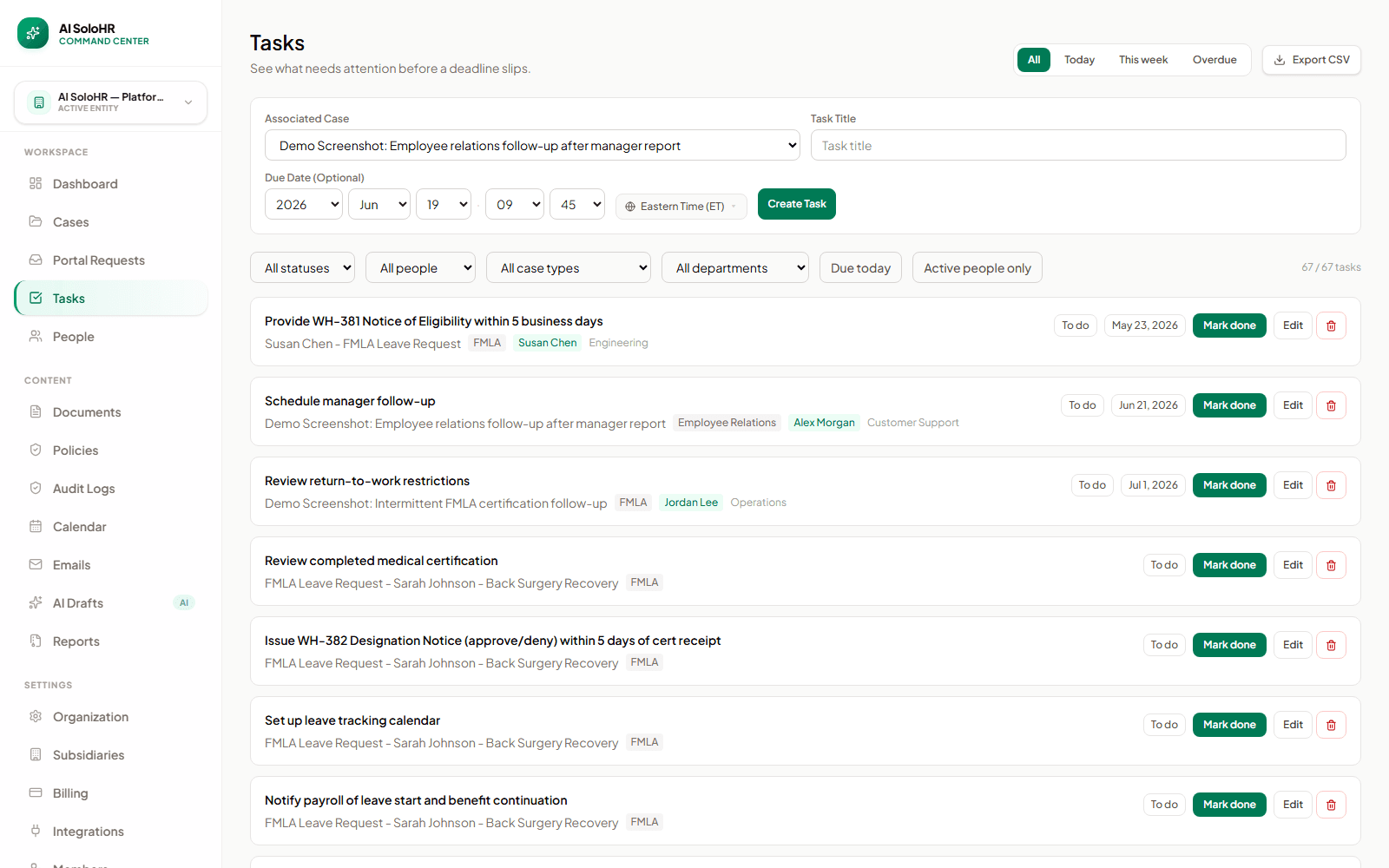
The plans are built around case tracking, task visibility, documents, timelines, reviewed AI drafts, and a cleaner audit trail for recurring U.S. HR workflows.
Teams usually feel the difference fastest when one person or a very small HR team is already carrying leave tracking, accommodation follow-up, employee relations notes, or benefits renewal coordination in scattered tools.
Buying a plan does not mean AI SoloHR becomes legal counsel, a payroll platform, or an autonomous compliance engine. Human review and professional judgment still sit outside the product.
HR Director • Apex Logistics
"Before: Spreadsheets caused missed FMLA certification timelines, creating huge legal risk."
After: Chose AI SoloHR. Zero missed deadlines, and automated notice generation cut admin time by 80%.
Impact: Walked into board meetings with complete, audit-ready case files. HR is finally respected as a risk management asset.
Director of HR • CareFirst Healthcare
"Before: Medical details were scattered in shared drives, violating basic HIPAA guidelines."
After: Leveraged isolated secure vaults. Logged every interactive meeting milestone to build a defensible EEOC trail.
Impact: Proved our compliance diligence to carriers during renewal reviews, preventing premium penalty hikes.
VP of People • Greenfield Care
"Before: A disorganized warning timeline left us open to potential wrongful termination claims."
After: Implemented chronological case logs for employee relations. Every file is locked against retroactive edits.
Impact: Our Glassdoor rating rose from 3.1 to 4.2 as processes became transparent. Hiring is much easier now.
ROI checkpoints
AI SoloHR is not priced like a broad HRIS. It should pay for itself when sensitive recurring workflows become easier to find, explain, review, and move forward.
How many FMLA/ADA follow-ups were missed in the last 6 months?
Each missed follow-up that escalates costs $65,000+ in legal fees. Preventing just one incident covers 68 months of the Solo HR plan ($79/mo).
How many hours/week does HR spend rebuilding case histories?
If more than 2 hours/week, AI SoloHR recovers 100+ hours/year. At $28/hr (median HR specialist rate), that represents $2,800+/year in recovered time.
Do you store sensitive medical records in shared folders or email?
A single ADA/EEOC confidentiality breach investigation averages $25,000+ in settlements plus 4 months of legal distraction.
How easily could you prove your documentation in a surprise audit?
Rebuilding histories manually costs hours of stress. AI SoloHR generates a defensible, timestamped timeline in 2 minutes.
Trial FAQ
Pricing clarity matters most when the work is sensitive. These are the questions a solo HR owner should be able to answer before starting a trial.
Yes. The trial is a 14-day free trial for real workflow evaluation: 3 active cases, 30 employee records, and 5 reviewed AI drafts. No credit card is required.
After the 14-day trial, you can choose a paid plan to continue. If you do not upgrade immediately, your account is gracefully paused and your data is retained for 30 days.
No. The trial starts without a credit card so a small HR team can evaluate one real workflow before deciding whether to upgrade.
Yes. AI SoloHR is currently designed around U.S. HR workflows such as FMLA, ADA accommodations, employee relations documentation, benefits renewals, and state-sensitive privacy obligations.
Absolutely. You can upgrade, downgrade, or update payment methods at any time from your billing settings.
Solo HR is best for one HR owner. HR Ops Team is the recommended plan when you need shared access, RBAC, employee portal requests, Google Calendar task sync, and audit readiness snapshots.
No. AI SoloHR organizes workflow, records, deadlines, and reviewed drafting. It does not provide legal advice, medical judgment, or automatic eligibility determinations.
AI draft usage is meant for reviewed workplace communication. Drafts stay connected to the case context, but HR reviews facts, tone, policy fit, and escalation needs before using them.
AI SoloHR is easier to judge in motion than on a static feature checklist. The right question is whether one recurring HR workflow becomes calmer, more visible, and easier to defend when it moves into cases, tasks, documents, timelines, and reviewed drafts.
The clearest way to evaluate AI SoloHR is to run one real case or recurring process through it, such as leave tracking, accommodation follow-up, employee relations documentation, or a renewal workflow.
The product earns its keep when your team spends less time rebuilding the story from inboxes, spreadsheets, and memory, and more time moving the workflow forward with a clearer record.
Teams get value fastest when the work is already happening today and already creating follow-up, document, and communication pressure for a very small HR team.
HR professionals who can demonstrate audit-ready case management and defensible documentation workflows are consistently rated as higher performers and are more likely to be promoted to senior HR roles. AI SoloHR is the operational system that makes that capability visible.
Good pricing clarity also means being explicit about what AI SoloHR is not trying to be. The product is designed for the workflow layer around sensitive HR work, not every category of HR software.
Choose a plan that fits your current operational needs, whether you need simple checklists or advanced case tools.
Case files, doctor restriction notes, and timelines are scattered across individual inboxes. High documentation risk.
Using standard doc templates, but lacking automatic date alerts, task assignment, and change history logs.
All dates, documents, secure timeline logs, and approved AI drafts are locked in one central system of record.
Understand the return on investment when moving from manual spreadsheets to a compliant workspace.
Missed follow-up milestones, lost witness signatures, and disorganized employee files.
Automatic task assignment, timeline tracking alerts, and secure central document vault.
Factual, chronological history locked against retroactive edits, ready for audit export.